Social channels
Confirm the YouTube, LinkedIn and Facebook channels that belong to you and your competitors, so AI citations of them count in Share of Voice.
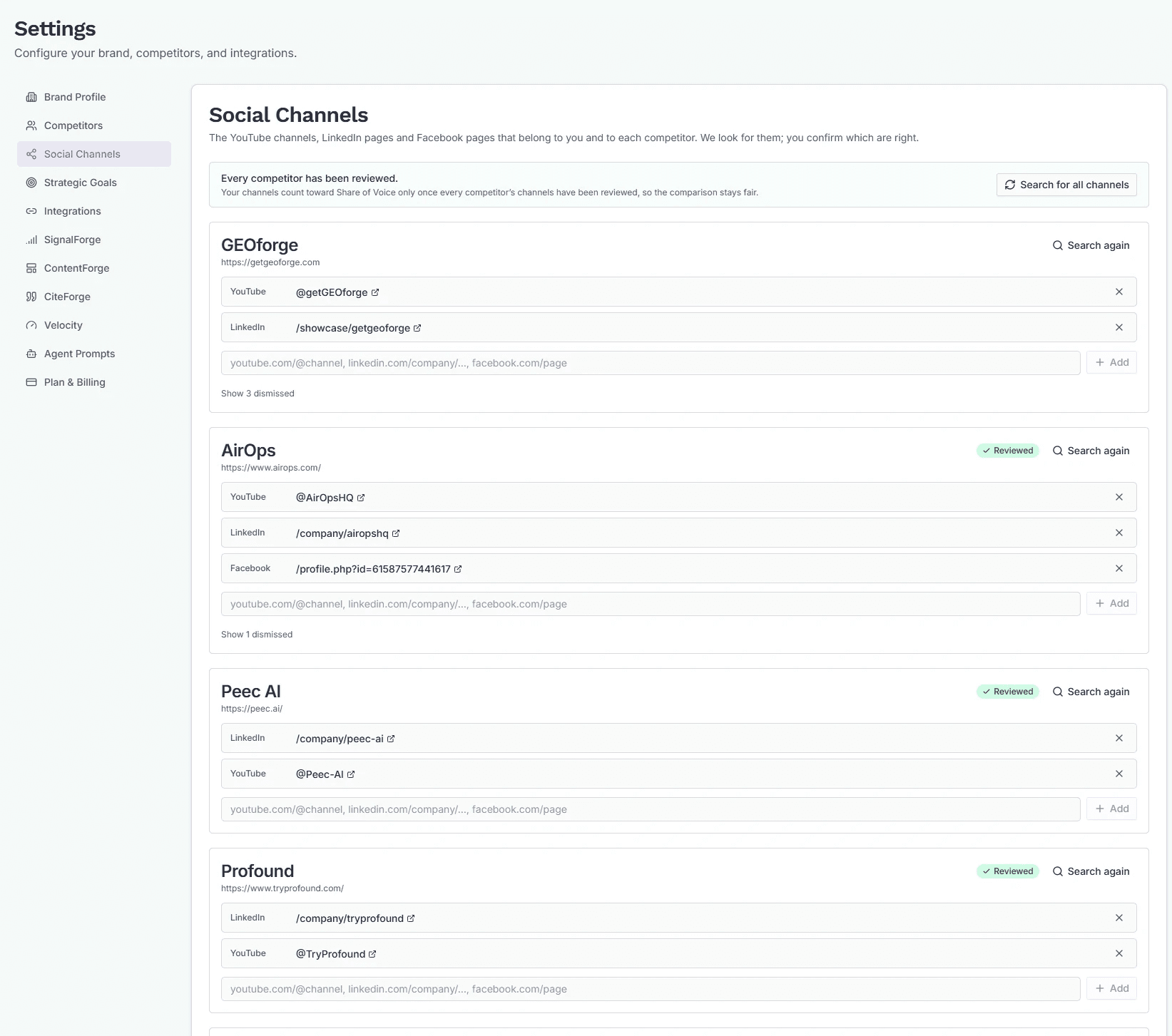
AI engines often cite a company's YouTube videos, LinkedIn posts or Facebook page rather than its website. The Social Channels tab in Settings is where you record which of those channels belong to you and to each competitor, so a citation of them counts in Share of Voice the same way a citation of the company's website does.
Everyone on your team can see the tab. Only brand admins can confirm, add or remove channels.
What counts
Once a channel is confirmed, these citations credit the company that owns it:
- YouTube — the channel page and any video published on that channel.
- LinkedIn — the company or showcase page, and posts the company published from it. Articles and personal profiles belong to the people who wrote them, so they never count for the company.
- Facebook — the company's page.
A channel confirmed for both you and a competitor counts as yours. A channel confirmed for two competitors counts for neither.
Why every competitor has to be reviewed first
The banner at the top of the tab shows how many competitors have been reviewed, for example "3 of 5 competitors reviewed."
Channels start counting only when every competitor has been reviewed, and that includes your own channels. If your channels counted while a competitor's hadn't been checked, your Share of Voice would rise simply because their channels were missing. Until the last competitor is reviewed, Share of Voice is measured on websites alone.
When channels start counting, or a confirmed channel is added or removed, GEOforge recalculates your Share of Voice history so the trend stays comparable.
Suggested channels
GEOforge looks for channels on its own. It reads each company's website for links to its social profiles, and searches for the company's name on each network. It runs when you set your website, and when you add a competitor or change its website. Nothing it finds counts until a person confirms it.
Each suggestion appears under "We found these — are they yours?" (or the competitor's name), with a note on where it came from: Linked from their website, or the Google result it matched.
- Theirs confirms the channel.
- Not theirs dismisses it. GEOforge won't suggest it again. Show N dismissed lists dismissed channels, and Undo brings one back as a suggestion.
To look again, click Search again on one company, or Search for all channels at the top. A search takes a few seconds per company. If it takes longer than usual, the tab says so and the results appear when it finishes.
Adding a channel yourself
Paste the channel's address into the box at the bottom of a card and click Add (or press Enter). For example:
youtube.com/@yourchannellinkedin.com/company/yourcompanyfacebook.com/yourpage
Channels you add are confirmed straight away. To remove a confirmed channel, click the × next to it.
Marking a competitor reviewed
A competitor's card shows Needs review until someone has answered every suggestion for it and confirmed the list is complete. When no suggestions are left, click:
- These are all of them if the confirmed channels are the full list, or
- They have no channels if the competitor has none.
The badge then changes to Reviewed. Answering the last suggestion on a card marks it reviewed too. A new suggestion for that competitor puts it back to Needs review.
Seeing Share of Voice without channels
The Share of Voice report has an Include social channels switch, on by default. Turn it off to see your numbers measured on websites alone. The switch changes only what you're viewing, not how anything is stored.