Brand profile settings
Configure the brand identity, keywords, sitemap, and voice guidelines that GEOforge uses across content generation and measurement.
The Brand Profile tab under Settings holds the core identity GEOforge uses everywhere else: when the Writer drafts content, when CiteForge classifies opportunities, and when the platform measures share of voice.
Only admins (and superadmins) can edit these fields. Other users see the form in read-only mode.
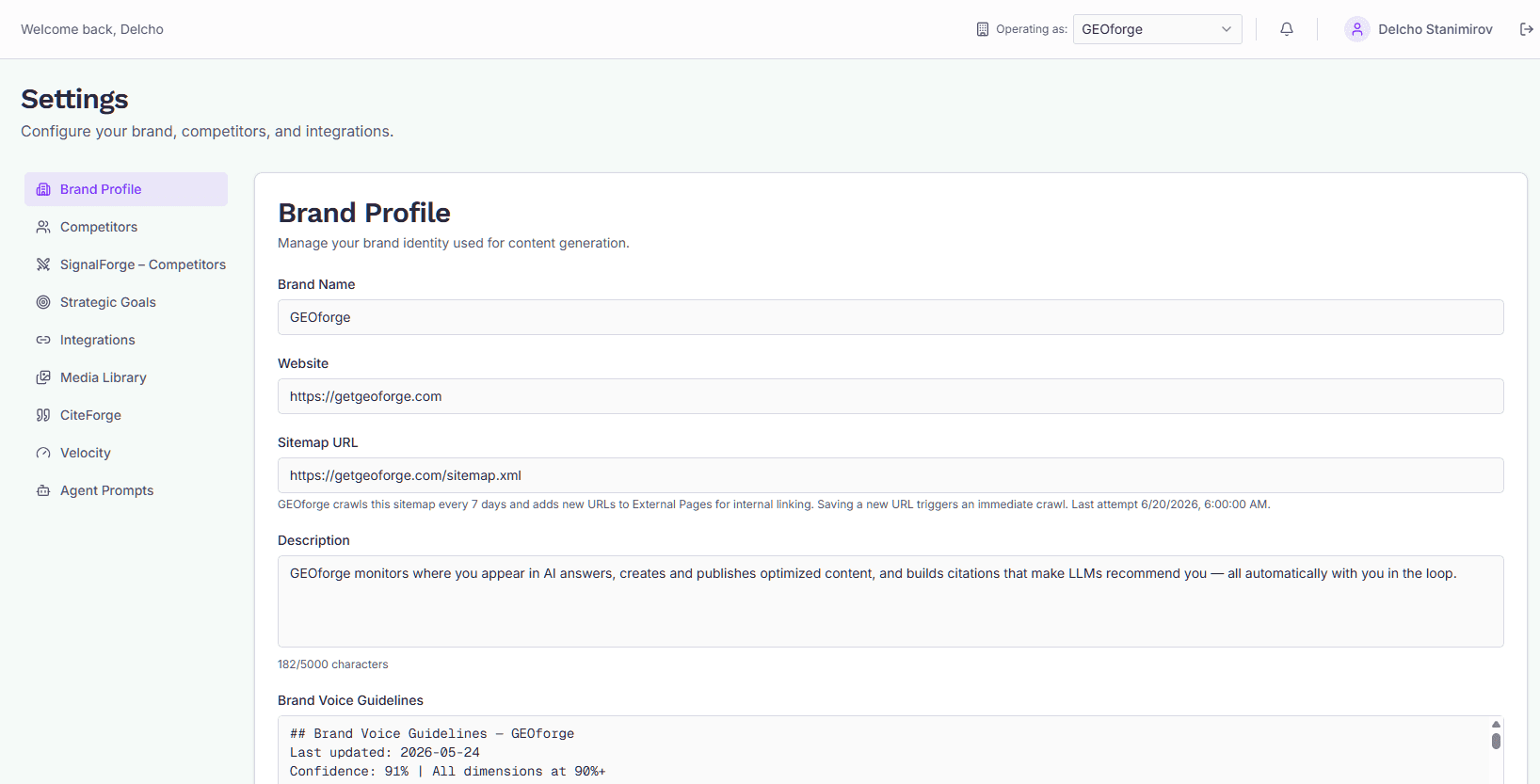
Fields
Fields appear on the form in the order below — matching what you see in the app.
Brand Name
The brand name as it should appear in generated copy and in references back to you across the dashboard. Use the form you want to see in print — including capitalization and any trademark spelling.
Website
Your primary domain (for example https://example.com). GEOforge uses this to:
- Anchor citation tracking in CiteForge (citations to this domain count as yours).
- Resolve internal links during content generation.
- Match your company against off-site mentions.
Use the canonical URL with scheme. If your site is reachable on both www and apex, enter the version you actually publish on.
Sitemap URL
The URL of your XML sitemap (for example https://example.com/sitemap.xml). GEOforge fetches this on a 7-day cycle and adds any new URLs it finds to External Pages, where they're used as internal-link candidates during content generation.
Saving a new URL (or changing an existing one) kicks off an immediate fetch, so you don't have to wait for the next scheduled cycle. Clearing the field stops future fetches.
Below the input you'll see the most recent attempt timestamp. If the last fetch failed (non-200 response, invalid XML, file unreachable), a short "Last crawl failed" message with the error appears beneath it. Fix the underlying issue on your site and save the field again to retry.
If the message says the website blocked our crawler (HTTP 401 or 403), your site's firewall, CDN or security plugin is refusing the request. Two different things can trigger that, and they need different fixes:
- The user agent. GEOforge identifies itself as
GEOForge/1.0(the full header isMozilla/5.0 (compatible; GEOForge/1.0; +https://getgeoforge.com)). A security plugin or WAF rule that blocks unrecognised bots will reject it. Ask whoever manages the site to allowlist that user agent. - The IP address. Many hosts — Hostinger and Cloudflare-fronted sites among them — block traffic from cloud and datacenter networks outright, whatever the user agent says. The tell is that the sitemap loads fine in your own browser but GEOforge still gets a 403. The fix is an IP allowlist rule, and the error message includes the crawler's IP address when there is one to give. This usually needs the hosting provider's support team rather than a setting in your CMS.
Once the allowlist is in place, use Retry crawl next to the error to run it again immediately instead of waiting for the next cycle.
Description
A short paragraph describing what the brand does, who it serves, and how it positions itself. The Writer agent and other prompts read this to keep generated content on-brand. One or two sentences is usually enough — longer is fine if your positioning genuinely needs it. Up to 5,000 characters.
Content Language
The language every draft is written in — body, headings and SEO metadata.
On Auto — match the topic title, the Writer matches whatever language each topic's title is in. Set a specific language when your knowledge base is in a different language from your titles, which is the case where matching alone can drift: the Writer has two signals pointing in different directions and no instruction to settle it.
Whatever you choose is passed to the Writer as an instruction. For around 34 widely-used languages GEOforge also checks the finished draft and corrects it automatically if it came out wrong. For the rest the instruction still applies, but the automatic check can't verify the result.
If you change this and want existing drafts brought into line, Language Check finds the ones that don't match and rewrites them.
Brand Voice Guidelines
Free-form guidance on how the Writer should sound when drafting content for this brand: tone, register, words to prefer or avoid, point of view, formatting preferences. Changes take effect on the next draft generated.
Concrete examples beat abstract instructions. "Avoid hedging words like 'might' and 'could'" is more useful than "be confident." Up to 5,000 characters.
Brand Name Variations
A list of additional ways your brand name appears in the wild. GEOforge already matches the obvious variants automatically (spaces removed, spaces replaced by hyphens), so you only need entries here for names that aren't a trivial transform of your Brand Name — for example, a casual short name customers actually use, an acronym, or an alternate spelling.
This is a plain textarea — enter one variant per line. Duplicates and blanks are dropped automatically. These entries widen the branded-query filter in SignalForge → Analytics and the brand-mention detection used elsewhere across the platform.
Saving changes
Edits are saved when you submit the form. Changes take effect immediately:
- Writer drafts started after the save use the new description, voice guidelines, and keywords.
- A new sitemap URL kicks off a crawl right away.
If you don't see the result you expect in a generated draft, check that the field actually saved (the form should reflect the stored value on reload) and that you regenerated the draft after saving — content that was already in progress used the old values.
Creating your account
How to sign up for GEOforge, verify your email, start your 14-day free trial — with or without a Google account — and add a second brand to an account you already have.
Additional profile settings
The Settings tabs beyond Brand Profile — Competitors, Strategic Goals, Integrations, ContentForge, CiteForge, Velocity, and Agent Prompts.