External pages
Manage the list of external URLs that BaseForge uses as internal-link candidates when generating and refreshing content.
External Pages is the list of URLs BaseForge knows about on your own site. Content generation and refresh workflows draw from this list when suggesting internal links — so the more complete it is, the better your internal linking will be.
This is a URL-and-title registry, not a content store. BaseForge doesn't crawl the page bodies here; it uses the URLs and titles as link targets. If you want a page's content indexed into your knowledge base, upload or sync the source instead (see Manage Knowledge).
How URLs get added
There are two ways pages end up in this list:
- Automatic sitemap import. Every 7 days, BaseForge fetches the sitemap URL configured on your brand and adds any new URLs it finds. URLs added this way are labeled as
sitemapsources. - Manual entry. You can add a single page at a time using the Add Page button.
Sitemap import is configured in the Brand Profile section of Settings, not on this page. If you don't have a sitemap configured, the list will only contain whatever you've added by hand.
Adding a page manually
Click Add Page and fill in:
- URL — the full URL of the page, including
https://. - Title — the human-readable title. This is what the link generator will see when deciding whether a page is a good link target, so use the actual page title, not a slug.
Both fields are required. The page appears at the top of the list immediately after you save.
Manually added pages are labeled with a manual source so you can tell them apart from sitemap-imported ones.
The page list
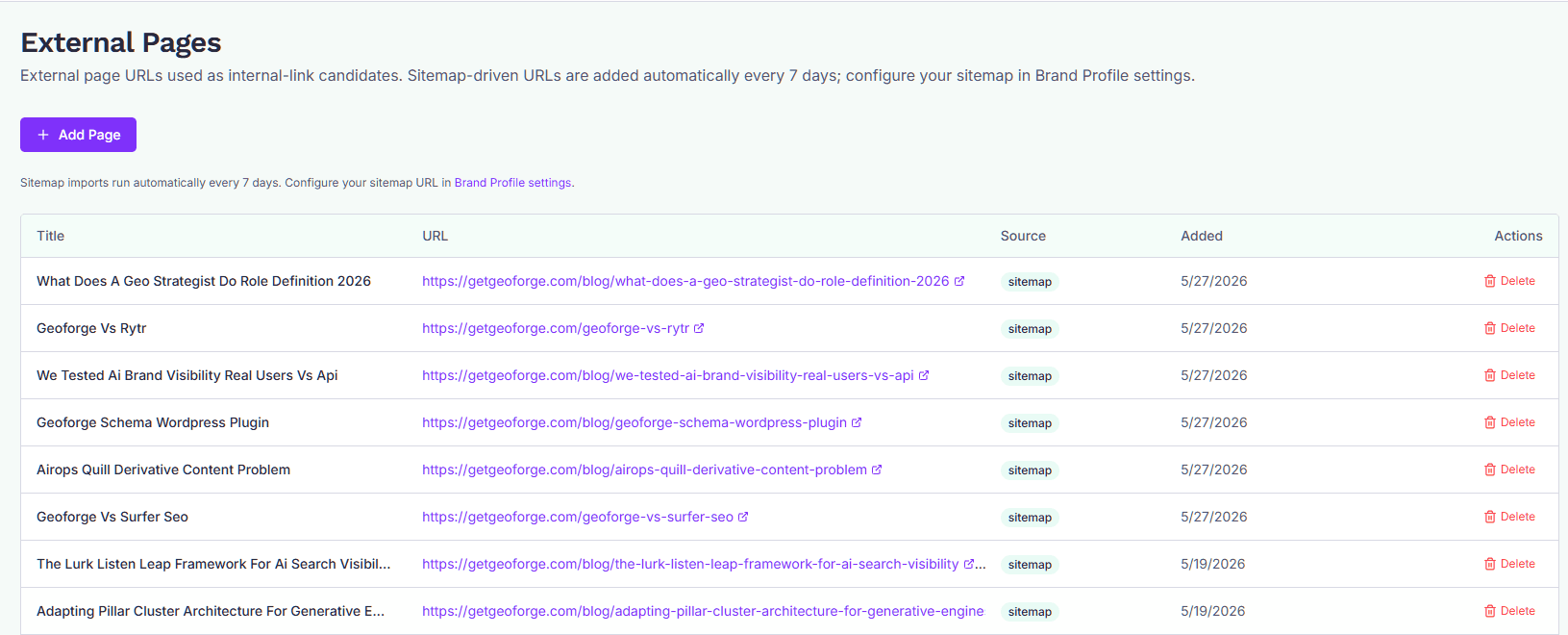
Each row in the table shows:
- Title — the title you (or the sitemap importer) provided.
- URL — the live link. Click it to open the page in a new tab.
- Source —
sitemapormanual, depending on how the URL was added. - Added — the date the URL first entered the list.
The list is paginated 20 rows per page. Use Previous and Next at the bottom to move through it.
Deleting a page
Click Delete on the row you want to remove. The page disappears immediately and stops being offered as an internal-link candidate.
A few things to know:
- Deletion is per-page; there's no bulk delete.
- If you delete a URL that's still in your sitemap, the next sitemap sync (within 7 days) will re-add it. To stop it from coming back, either remove it from your sitemap or change your sitemap configuration in Brand Profile.
- Deleting an external page does not affect any content you've already published that links to it.
When to curate this list
You generally don't need to babysit External Pages — the weekly sitemap sync keeps it current. Step in when:
- You've published a new page that isn't in your sitemap yet and you want BaseForge to start linking to it now.
- Your sitemap includes URLs you don't want offered as internal links (legal pages, thank-you pages, low-quality archives). Delete them, then remove or filter them in your sitemap so they don't come back.
- A page has been redirected or retired. Delete the old URL so the link generator doesn't suggest it.