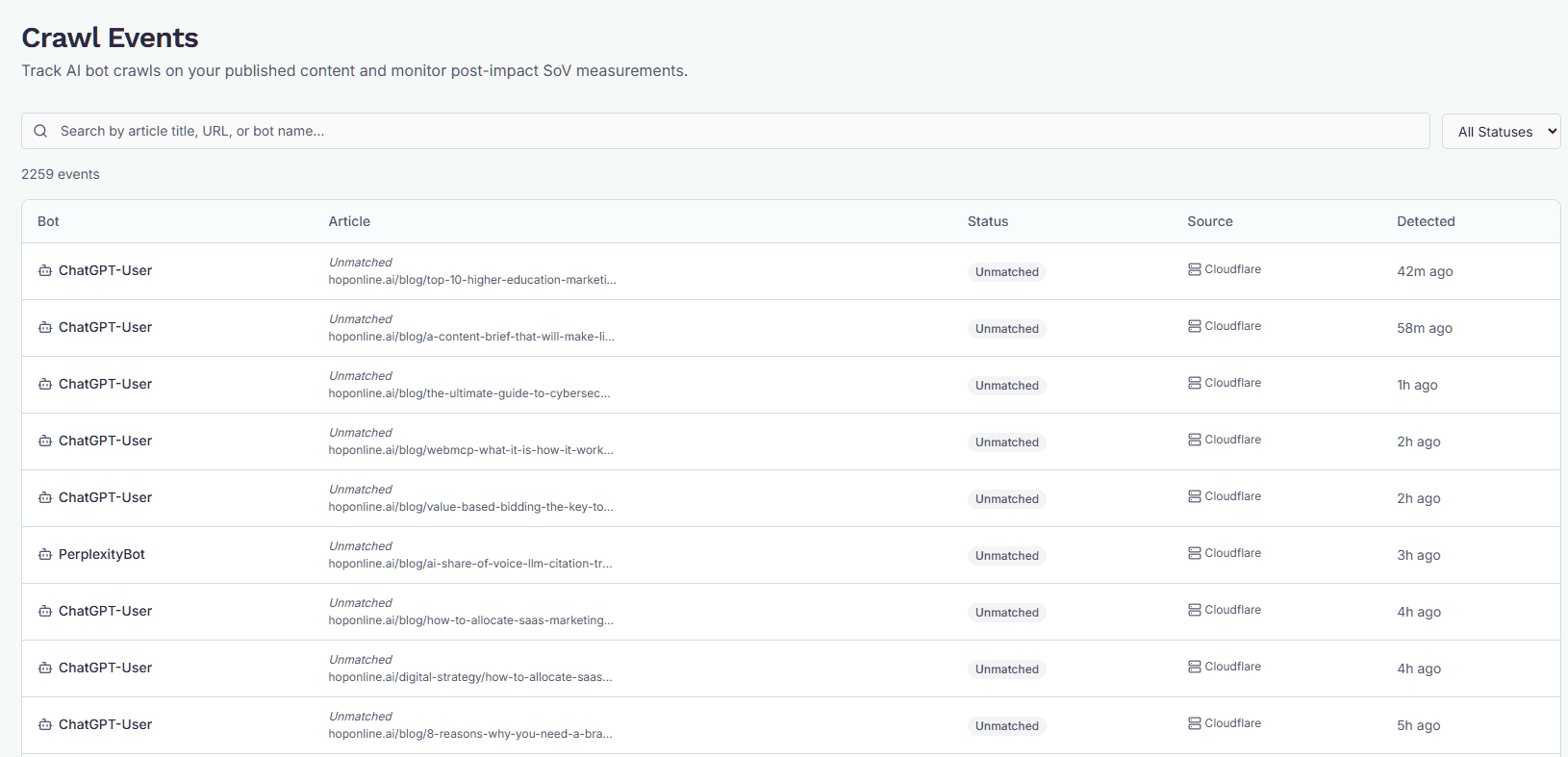
Crawl Events
See which AI bots have crawled your published content, when, and whether GEOforge matched the hit to a tracked article.
The Crawl Events page logs every AI bot hit GEOforge has detected on your published content. Use it to confirm that engines like GPTBot, PerplexityBot, and ClaudeBot are actually reaching the articles you've published — and to spot crawls on URLs that aren't yet linked to a tracked topic.
Find it at ContentForge → Crawl Events.
Prerequisite: enable the Crawl Tracker
Crawl Events only shows data if the Crawl Tracker integration is turned on for your company. If it's off, the page shows a notice with a link to Settings → Integrations — enable it there and bot hits will start appearing as they happen.
Once enabled, pick one channel to detect bot hits (only one is active at a time, so the same crawl is never counted twice):
- Cloudflare — connect your Cloudflare account and GEOforge installs a crawl-tracker Worker on your domain automatically. No dashboard steps.
- WordPress plugin — install the GEOforge Schema plugin, then either click Configure Plugin (needs the WordPress user connected to GEOforge to be an Administrator) or use Manual setup, described below.
- Self-hosted / custom — for any other stack: deploy a small forwarder on your CDN edge, reverse proxy, or app using one of the generated snippets.
Wix sites can't be tracked here
Because Wix fully manages its own hosting, GEOforge has no way to observe AI bot crawls on a Wix site — so Crawl Events stays empty for Wix brands, and that isn't a setup problem you can fix.
Wix reports this itself instead. In your Wix dashboard, go to Analytics → All Reports → SEO and open AI Bot Traffic over Time and AI Bot Visits by Page.
Inside GEOforge, a Wix brand's AI-search performance is tracked through its connected Google Analytics and Search Console instead — see Analytics.
WordPress manual setup (no Administrator account)
Configuring the plugin from GEOforge writes its settings over the WordPress REST API, which WordPress only allows for Administrators. If you'd rather connect GEOforge with an Editor-level account, set the plugin up by hand instead — bot detection itself never needed admin rights:
- Install or update the GEOforge Schema plugin to v1.6.0 or newer.
- In GEOforge, open Settings → Integrations → Crawl Tracker and expand Manual setup — no Administrator required. Copy the webhook URL and secret.
- In wp-admin, go to Settings → GEOforge Schema, paste both values, and save.
- Back in GEOforge, click Verify & activate. GEOforge checks the plugin's public status endpoint and confirms the secret matches before switching the method to WordPress.
If verification fails it says why — the plugin is too old, nothing was saved yet, the site isn't reachable, or the saved secret doesn't match. Note that disabling and re-enabling the Crawl Tracker issues a new secret, so re-paste it in wp-admin if you ever do that.
What each row means
Each row is a single crawl event — one AI bot fetching one URL on your site, at one point in time.
The columns:
- Bot — the AI bot that made the request (e.g. GPTBot, PerplexityBot, ClaudeBot). This is identified from the request's user agent.
- Article — the title of the matched ContentForge topic, plus the URL that was crawled. If GEOforge couldn't match the URL to a topic in your pipeline, the title shows as Unmatched and only the URL is displayed.
- Status — either Detected (the URL was matched to one of your tracked topics) or Unmatched (the bot hit a URL on your domain that doesn't correspond to any published topic GEOforge knows about).
- Source — how GEOforge learned about the crawl.
- Detected — when the crawl happened. Recent events show as relative time ("12m ago", "3h ago", "2d ago"); older events show a date.
Filtering and search
Two controls at the top of the page:
- Search — matches against article title, crawled URL, and bot name. Typing is debounced, so results update shortly after you stop typing. Click the X inside the field to clear it.
- Status — filter to Detected only, Unmatched only, or leave on All Statuses.
The result count under the controls reflects whatever filters are active.
Pagination
Events are shown 20 at a time, most recent first. Use Previous / Next at the bottom to page through history. The current page and total page count are shown alongside.
How to read this page
A few patterns to look for:
- A published topic with no crawl events for a long time — the bot may not have discovered the URL yet. Check that the page is in your sitemap and that you haven't blocked the bot in
robots.txt. - Lots of Unmatched rows on URLs that look like yours — bots are crawling content GEOforge isn't tracking. Those URLs were either published outside ContentForge, or the URL on the topic doesn't match what the bot fetched — check for trailing slashes,
www.prefix, or scheme differences. - A specific bot missing entirely — that engine may not be crawling your domain yet, or your hosting setup may be blocking it before the request reaches GEOforge.
Related
- Published-topic performance and Share of Voice lift live on the SignalForge Performance tab. Whether a topic has been crawled feeds into that view as well.