Discovery
How the Discovery tab catalogs every citation source AI engines have used for your tracked prompts.
Discovery is your raw inventory of citation sources. Every URL that an AI engine returned as a citation against one of your tracked prompts ends up here, deduplicated by URL and counted.
Use Discovery when you want to answer questions like:
- Which domains are AI engines pulling from most often in our category?
- Where are our competitors getting cited and we aren't?
- How fresh is the source pool — are new sources showing up, or are we seeing the same handful repeatedly?
If you want a prioritized, classified worklist instead of the raw pool, go to Opportunities. Discovery is the upstream view.
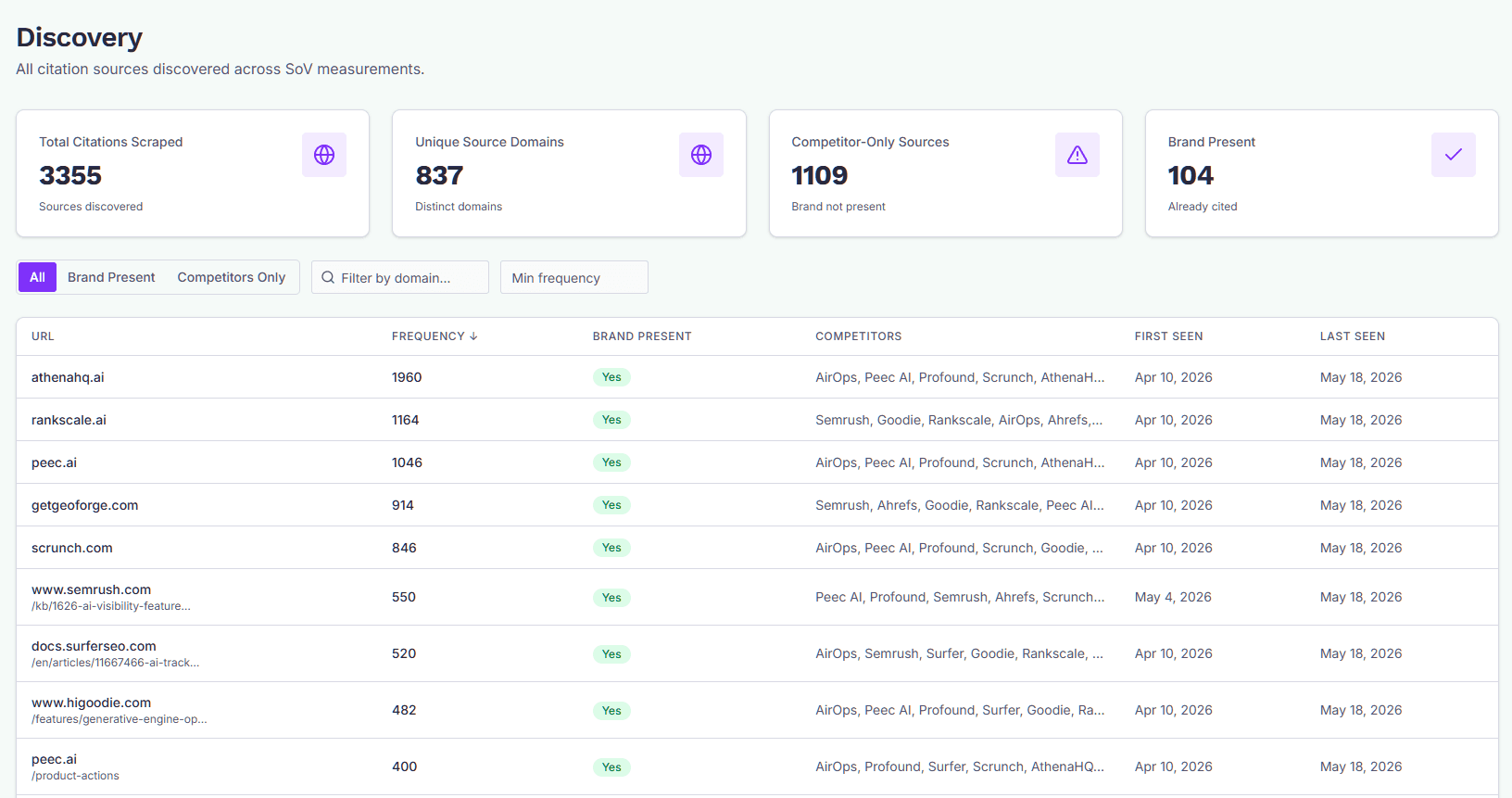
The four stats at the top
- Total Citations Scraped — Total citation source rows for this brand. One row per unique URL.
- Unique Source Domains — Distinct domains across all those URLs. A domain that gets cited on five different pages counts once here.
- Competitor-Only Sources — Sources where at least one of your tracked competitors is mentioned and your brand is not. These are the most actionable gaps.
- Brand Present — Sources where your brand already appears. Good for understanding your existing footprint.
Top pitch targets
On the Dominate and Enterprise plans, a Top pitch targets panel sits above the table. It lists the cited sites the Scout found would publish an article written by a company, with sites it couldn't decide on under Check by hand and sites that don't take outside articles under Won't publish. The panel is for reference; pitching starts from a pitch topic. See Pitching contributed articles.
The table
Each row is a unique URL, with:
- URL — domain on top, path underneath.
- Frequency — how many times this URL has been returned as a citation across all your tracked prompts. Higher = AI engines lean on it more.
- Brand Present — Yes/No. Whether your brand was detected in the page's content snippets.
- Competitors — comma-separated list of tracked competitors mentioned on the page.
- First Seen / Last Seen — when this URL first showed up as a citation, and the most recent time it was returned.
Frequency, First Seen, and Last Seen are sortable — click the column header to toggle direction.
Filtering
Three filters sit above the table:
- Brand filter tabs —
All,Brand Present, orCompetitors Only. "Competitors Only" is the fastest way to find gap sources worth pursuing. - Domain search — substring match against the source's domain. Type
redditto see all Reddit URLs,linkedinto see LinkedIn pages, etc. - Min frequency — hide one-off citations. Setting this to
3or higher trims the long tail and shows you sources AI engines repeatedly trust.
Filters combine — you can ask, for example, "competitor-only Reddit threads cited at least twice."
Your competitors' own websites, your own website, and sources with no realistic outreach path are hidden by default, because none of them is a placement opportunity. A competitor's own site always looks like a gap (it quotes them and never you), so it would otherwise crowd the top of the list. Tick Include unactionable sources to see them.
How sources get here
Discovery is populated automatically when GEOforge runs Share-of-Voice measurements for your tracked prompts. Each AI response gets parsed for cited URLs; each URL is fetched, the content is analyzed for brand and competitor mentions, and a row lands here.
You don't add sources to Discovery manually — it's a reflection of what AI engines are actually citing. If the table is empty or sparse, that usually means SoV measurements haven't run yet for this brand, or the engines aren't returning citations on your tracked prompts.
From Discovery to action
Discovery itself is read-only — it's a catalog, not a workflow. To pursue a source:
- Find an interesting row here (typically a competitor-only source with non-trivial frequency).
- Switch to Opportunities to see the same source classified, scored, and ready to action.
Not every source in Discovery becomes an Opportunity. Sources that fail the classifier's gates — for example, your own domain, social platforms with no realistic outreach path, or pages that don't fit a known opportunity type — stay in Discovery for reference but won't appear in the Opportunities worklist.