Tracking citation results
Use the Tracking tab to see how citation work is converting across the brand, and to record outcomes for opportunities you've actioned.
The Tracking tab is where you see how citation work is converting for the brand as a whole — win rate, wins by channel, and the funnel from discovered to placed. You can record an outcome here too, though most people now do that on Conversations, where the reply is actually read.
Every opportunity you've acted on appears here: Actioned, Replied, Won, No Response and Declined. Untouched (New) and Discarded opportunities live on the Opportunities tab.
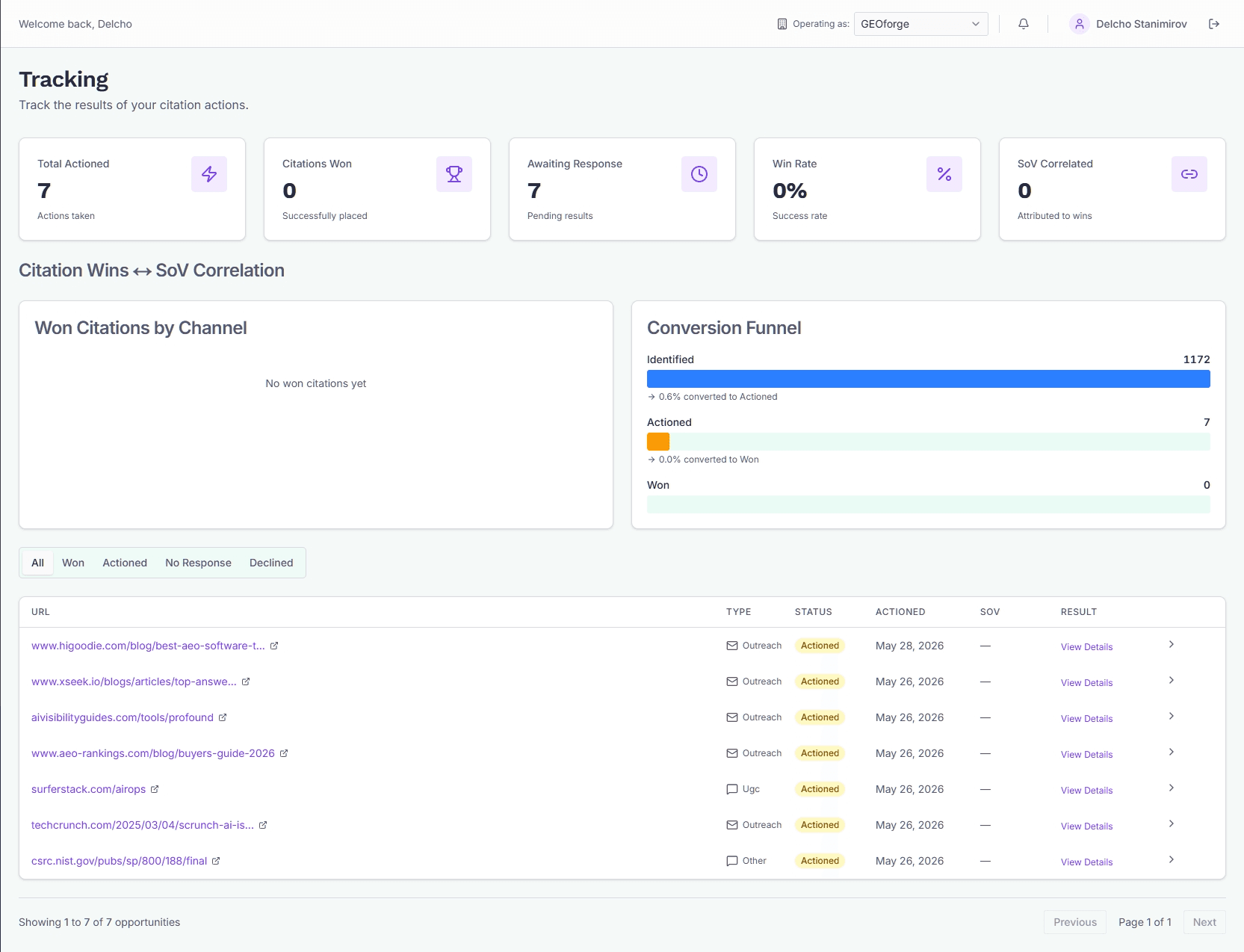
The KPI cards
Five cards across the top give you the running state of your pipeline for the current brand:
- Total Actioned — every opportunity you've drafted an action for, regardless of outcome.
- Citations Won — opportunities you've marked as won.
- Awaiting Response — opportunities you've pitched that nobody has replied to yet.
- Win Rate — won ÷ everything you've actioned, including conversations still waiting on you to record an outcome. Leave outcomes unrecorded and this number understates you.
- SoV Correlated — wins that have at least one citation result we've correlated with a Share-of-Voice measurement. This is the strongest signal that a citation actually moved the needle.
Won Citations by Channel
The bar chart on the left of the charts row breaks your won citations down by action channel: UGC, Outreach, and Other. Use it to see which channel is actually producing placed citations for the account — not which one you've spent the most time on.
If you haven't recorded any wins yet, the chart shows an empty-state message.
Conversion funnel
The funnel on the right shows three stages and the conversion rate between each:
- Identified — every opportunity CiteForge has discovered.
- Actioned — opportunities you've drafted an action for.
- Won — opportunities you've recorded as won.
The percentage between stages is how many of the previous stage made it to the next. A low Identified → Actioned rate means you're not working through the backlog. A low Actioned → Won rate means your drafts or targeting need work.
The results table
Below the charts is a paginated table of every actioned opportunity. Tabs across the top let you filter:
- All — Actioned, Replied, Won, No Response and Declined together.
- Won / Replied / Actioned / No Response / Declined — single-status views.
Replied is the one to watch: a prospect has answered and nobody has recorded what came of it. These are the wins waiting to be counted.
Each row shows the source URL, action type (UGC or Outreach), current status, the date the opportunity was last updated, whether it's SoV-correlated, and a link to the conversation.
The SoV column shows "Yes" when at least one citation result on this opportunity has been correlated with a SoV measurement.
Recording a result
Click the chevron at the right end of any row to expand the result-recording panel. Pick one of three outcomes:
- Won — the citation was placed. CiteForge schedules a verification re-scrape so we can confirm the citation is still live later.
- No Response — you've waited long enough and given up.
- Declined — the contact (or the platform) refused.
Add optional notes — anything that future-you will want to know about why this outcome happened — then click Record Result. The opportunity's status updates to match the result type, the row refreshes, and the KPI cards re-tally.
You can record the same outcome from the conversation itself, using the Outcome bar under its header — see Conversations. It writes the same row either way, so use whichever screen you are already on. In practice that is usually Conversations: you know the answer the moment you read the reply.
Results are attached to the most recent action on the opportunity. If you've drafted multiple actions (e.g. an outreach email and then a UGC reply on the same opportunity), the result is recorded against the latest one.
Open conversation
The Open conversation link on each row opens the opportunity in Conversations, where you can read the whole thread, see every draft on it, and expand Opportunity details for the source context, the score breakdown and how AI answers reference the page. Use it when you need more context than the row gives you.
Tips
- Record results as soon as you know them, from whichever screen you are on. The Win Rate and SoV-Correlated counts are only as useful as your most-stale entry.
- Work the Replied tab regularly. A reply with no outcome recorded is a win the numbers cannot see.
- "No Response" is a valid result. Leaving things in Actioned forever skews the funnel and inflates Awaiting Response.
- The SoV correlation count updates as new SoV measurements run — an opportunity you marked Won today may become SoV-correlated next week.