Scheduled outreach
Let GEOforge find, draft and queue outreach emails for your best citation opportunities on a schedule.
Outreach is normally something you do one opportunity at a time. Scheduled outreach does the preparation for you: it picks your best sendable opportunities on a schedule, finds a contact address, drafts the pitch, and queues it.
By default nothing leaves without your approval. You review a prepared draft and send it with one click.
Turn it on under Settings → CiteForge.
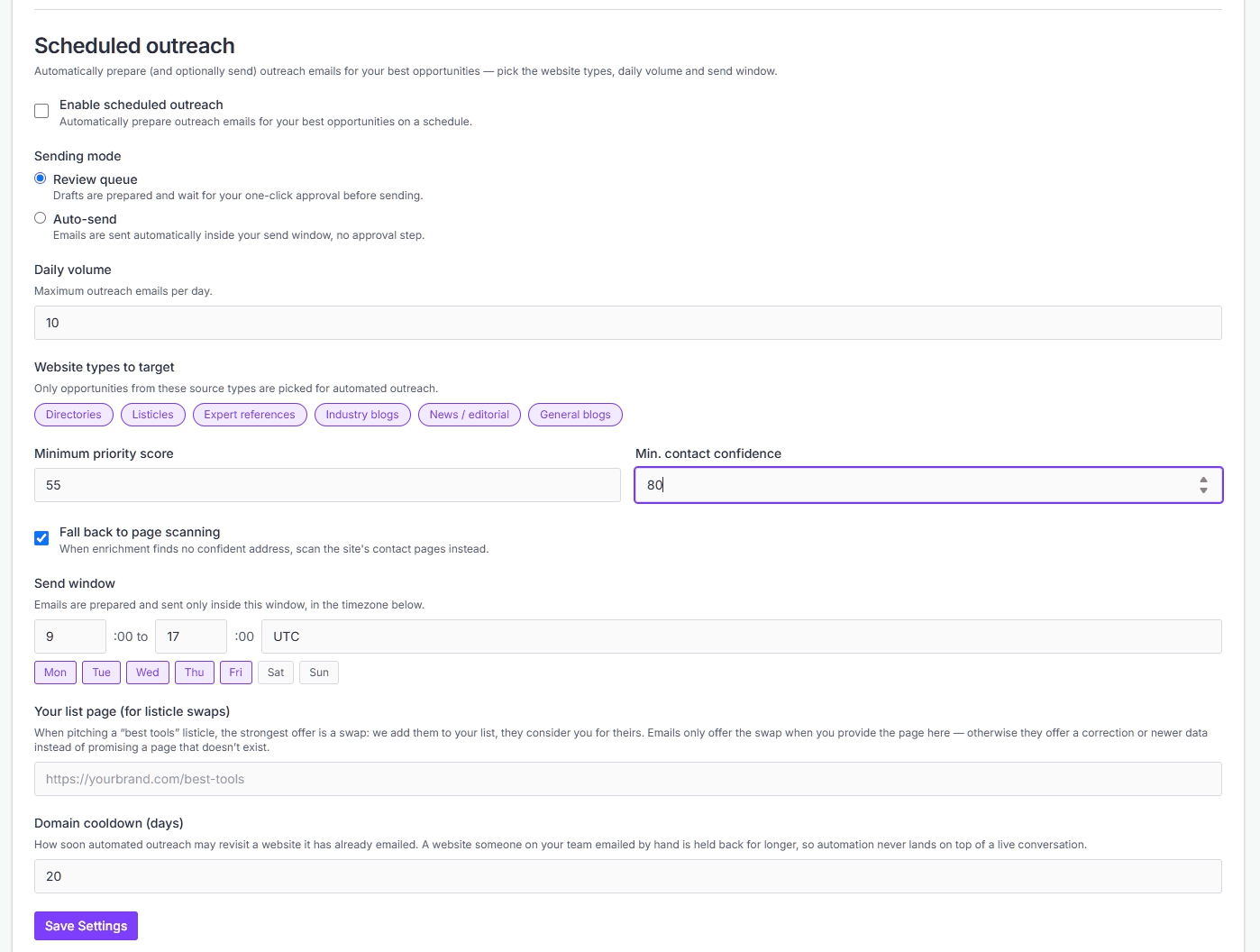
Sending mode
Review queue is the default. Drafts are prepared and wait for your one-click approval before sending. They appear in the Scheduled folder in Conversations, marked Awaiting approval.
Auto-send sends automatically inside your send window, with no approval step. It requires a verified outreach sending domain — set that up under Settings → Outreach email first, or the option stays unavailable.
Even on Auto-send, a draft with an unfilled placeholder in it is held back for review rather than sent.
Choosing what gets picked
Daily volume caps how many outreach emails are prepared per day. Where your plan sets its own ceiling, it's shown next to the field.
Website types to target limits which kinds of sites are eligible: Directories, Listicles, Expert references, Industry blogs, News / editorial, and General blogs. These are the categories with a real editorial contact on the other end.
Minimum priority score and Min. contact confidence set the floor. The first is the opportunity's own score; the second is how sure GEOforge is that the address it found is the right person.
Fall back to page scanning decides what happens when no confident address is found. With it on, GEOforge scans the site's contact pages instead of skipping the opportunity.
When emails go out
Send window sets the hours, days and timezone that outreach is prepared and sent in. Emails are only handled inside that window.
Domain cooldown (days) controls how soon automated outreach may revisit a website it has already emailed. A website someone on your team emailed by hand is held back for longer, so automation never lands on top of a live conversation.
Your list page
If you're pitching a "best tools" listicle, the strongest offer is a swap: you add them to your list, they consider you for theirs.
Set Your list page (for listicle swaps) to the URL of your own list. Emails only offer the swap when you provide it — otherwise they offer a correction or newer data instead of promising a page that doesn't exist.
Finding the right contact
GEOforge looks up a contact for the site rather than mailing a generic inbox. Where an article is cited, it prefers the person who actually wrote it.
Addresses reported as undeliverable are discarded rather than tried, and an address that hasn't been confirmed is checked before anything is sent unattended.
If outreach pauses itself
Repeated delivery problems — bounces or spam complaints — pause scheduled outreach for your brand. The settings panel tells you it's paused and why.
Saving your settings resumes it. If the underlying problem hasn't been fixed, it will pause again, so it's worth checking the bounced outreach in Needs attention in Conversations before you resume.
What it doesn't do
Scheduled outreach prepares and sends the first email. Replies come back into Conversations and are yours to answer — nothing replies on your behalf.
It also doesn't create opportunities. It only works from what Discovery has already found and scored, so if the queue is thin, the place to look is Discovery and Opportunities.
Pitching contributed articles
How the Scout finds sites that publish articles written by companies, and how GEOforge pitches a contributed article to them one site at a time.
Tracking citation results
Use the Tracking tab to see how citation work is converting across the brand, and to record outcomes for opportunities you've actioned.