Editing the entity map
Rename, re-categorise, hide, pin, merge or add entities on your Entity Map. Your changes are kept when the map is rebuilt.
The Entity Map is built automatically, so it will sometimes get a name, a category or an ownership wrong, or list the same thing twice. Brand admins can correct it. Every change you make is kept when the map is rebuilt: the next refresh fills in new evidence but never overwrites a field a person has set.
Only brand admins can edit. Other team members see the same entities and evidence, without the edit form.
Opening an entity
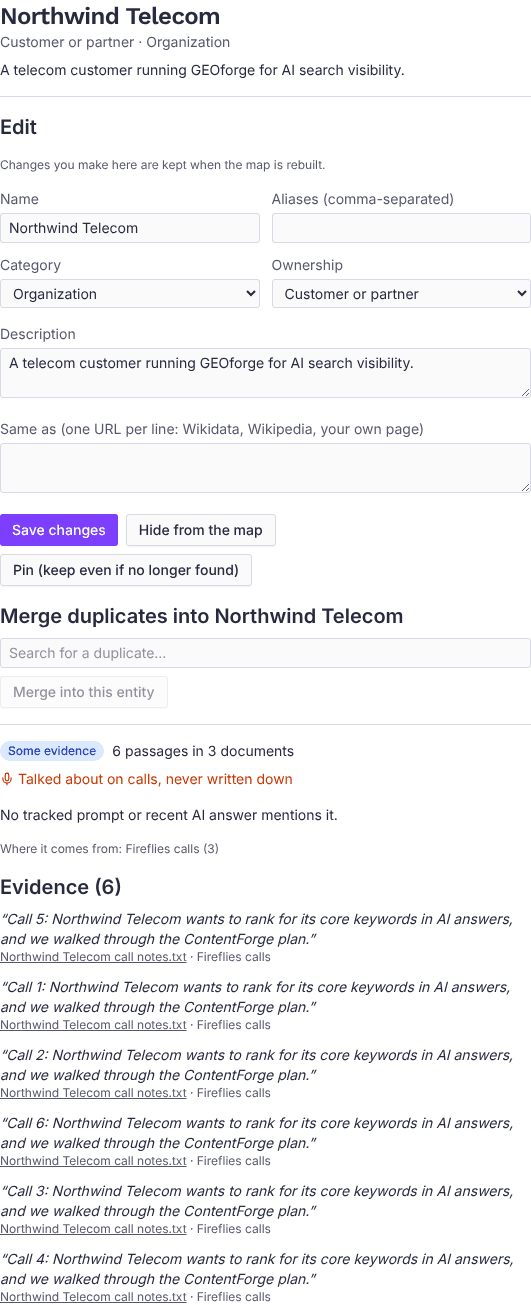
In Entities and their evidence, find the entity with the search box or the All ownership and All evidence filters, then click it. The panel shows the entity's name and description, the edit form, and then its evidence: how strong it is, how often your tracked prompts and AI answers mention it, where it comes from, and the passages themselves. Each passage links to the document it came from.
What you can change
- Name: the old name is kept as an alias, so evidence that uses it still counts.
- Aliases: other names for the same thing, comma-separated. Evidence under any alias counts towards the entity.
- Category: what kind of thing it is (product, feature, person, technology and so on).
- Ownership: whose it is (Your brand, Yours, Customer or partner, Competitor, Industry or Generic). Choosing Generic hides the entity from the map; see below.
- Description: what the entity is, in a sentence or two. ContentForge uses your descriptions of your own products when it writes drafts, so they're worth getting right.
- Same as: links to the same thing elsewhere, one per line, such as its Wikidata item, its Wikipedia article or your own product page. Each line must start with
http://orhttps://. Once you've edited this list, the automatic Wikidata lookup leaves it alone.
Click Save changes to apply them.
Two entities can't share a name or an alias. If you try, you'll see which entity already uses the name. Usually they're the same thing, and the answer is to merge them.
Hiding and pinning
- Hide from the map removes an entity from the treemap, the panels and the list. Nothing is deleted. To find it again, tick Show hidden and generic above the list, open it and click Show on the map.
- Setting an entity's Ownership to Generic hides it the same way. Generic is meant for terms nearly every company mentions, not for things specific to you.
- Pin (keep even if no longer found) keeps the entity on the map even when a later rebuild no longer finds it in your knowledge base. Click Unpin to undo.
Merging duplicates
If the map lists the same thing twice, for example "NF" and "NodeForge Platform", open the one you want to keep. Under Merge duplicates into…, search for the other one, tick it and click Merge into this entity. The duplicate's names become aliases of the one you kept, and its evidence and links move across. You can merge several at once.
Adding an entity the map missed
Click Add an entity above the list, type its name, choose its ownership and click Add. The map links the passages that mention it straight away, and every later rebuild keeps it.
How your edits are used
Your corrections affect more than the map:
- ContentForge drafts are given the names and descriptions of your brand's own entities (Your brand and Yours), so a renamed product keeps its new name in new articles.
- Topic recommendations take into account what you own and where your evidence is thin.
- Content opportunities and Interviews worth recording use your ownership choices. Your brand, competitors and generic terms are never suggested.
- AI assistants connected to GEOforge see the corrected map.
A merge or an alias change updates the evidence straight away. Demand numbers (prompts and AI answers) catch up at the next morning's update.
Entity Map
See the products, people, competitors and topics your knowledge base covers, how well each is backed up, and which topics your tracked prompts and AI answers mention that you haven't written about yet.
External pages
Manage the list of external URLs that BaseForge uses as internal-link candidates when generating and refreshing content.